Certificate Generation
Certificates your recipients can prove, issued in minutes.
Design in a full canvas editor, merge a spreadsheet of recipients, and every credential leaves with a QR code anyone can check. No more calls to the registrar asking whether a certificate is real.
- 1 → 10,000+
- one design, any batch size
- QR
- on every credential
- 0
- calls to confirm it's real
Why it matters
A certificate is only worth what someone else can confirm
Paper and PDFs are easy to fake
A scanned signature and a school logo are all a forger needs. Employers know it, so every certificate is doubted a little.
Batches take days by hand
Copying names into a template one at a time invites typos, and a graduation list of hundreds turns into a week of checking.
Checking means emails and phone calls
Registrars spend hours answering "did this person really graduate?". The answer arrives days later, if it arrives at all.
With Certify, a whole class is issued in one sitting, each credential carries its own verification link, and anyone can confirm it in seconds without contacting you.
How it works
From start to finish in 5 steps
Step 01
Set up your brand kit
Upload your logo, seals and signatures, and choose your colours and fonts once. Every design you make starts from them, so nothing goes out off-brand.
01Step 02
Design the certificate
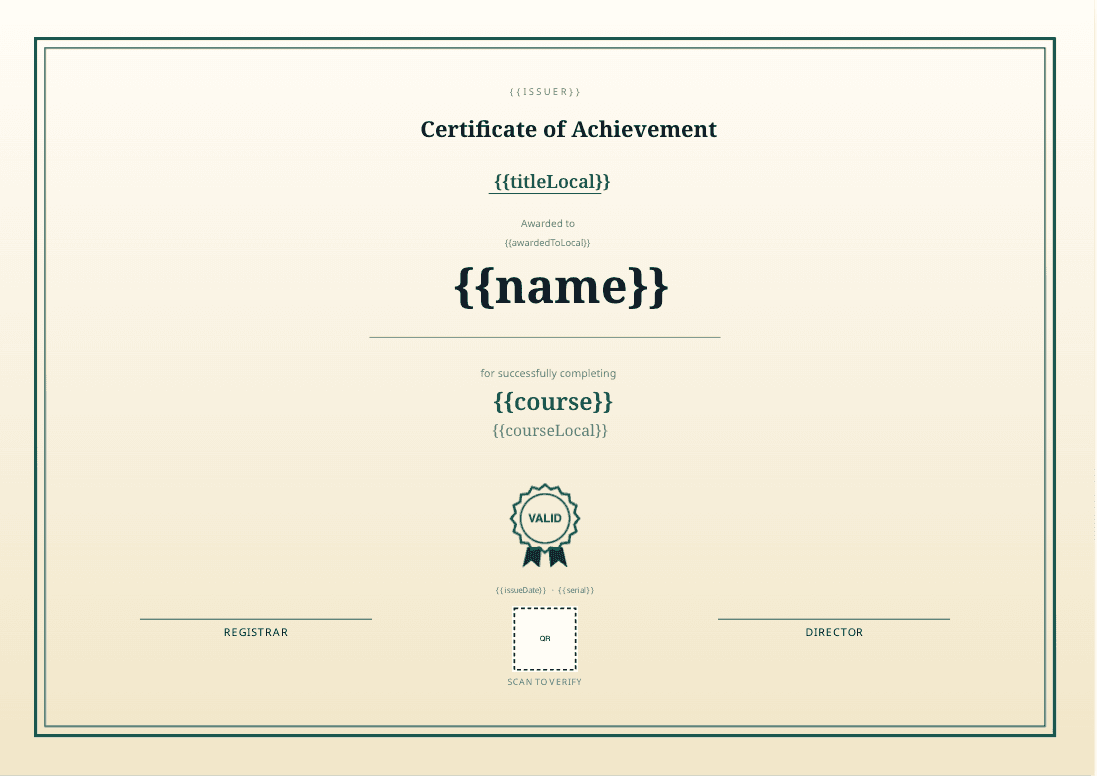
Start from a template, a blank canvas, or describe what you want to the AI assistant. Drop in fields like name, course and date where the recipient's details belong.
02Step 03
Upload your recipients
Bring an .xlsx, .xls or .csv file with one row per person. Columns are matched to your design's fields for you, and every row is checked in plain language before anything is generated.
03Step 04
Preview, then generate
See real rows first, including the longest names, so you know every one fits. Then generate: each person is rendered on their own, so one problem never holds up the rest.
04Step 05
Deliver and let the world verify
Email each person their certificate, or share the files yourself. The QR code and link lead to a public page that confirms the award is genuine and unchanged.
05
What you get
Built for the details that make it trustworthy
A real design studio
A full canvas editor with your brand kit, templates and precise layout, not a form with a logo slot.
AI design assistant
Describe the certificate you need and get a starting design you can refine by hand.
Three ways to issue
Upload a spreadsheet, type in a few people, or let your own systems issue through the API.
Long names that fit
Text shrinks gracefully so "Anastasia White-Oduya Mwangi" looks as good as "Ann".
Tamper-evident
Each issued file is fingerprinted. If anyone edits it, verification fails even though the QR still scans.
Revocable
Withdraw an award and its verification page says so straight away, instead of quietly passing.
Verification anyone can use
Scan the QR or open the link. No app, no account and no call to your office.
Private by design
The verification page confirms the award, never the holder's email or phone number.
Codes that can't be guessed
Each credential gets a random 12-character code, so no one can scan one and list your whole class.
Who it's for
Wherever proof of achievement matters
Universities and colleges
Degrees, diplomas and transcripts for a whole graduating class, verifiable by any employer.
Training providers and bootcamps
Course completion certificates issued the day the cohort finishes.
Professional bodies
Memberships, licences and CPD certificates that are easy to check and easy to withdraw.
Events and conferences
Attendance and speaker certificates sent to every participant in one batch.
HR and corporate learning
Compliance and internal training records employees can carry with them.
Schools and exam boards
Awards and results that parents and institutions can confirm without paperwork.
Questions people ask
Issue your next batch the smart way
Bring a real class list. You can have your first verified credentials out the same day.