
Digital Signatures
Get documents signed in hours, not weeks.
Upload a document, choose who signs and in what order, place their fields, and send. Signers sign from their email on any device, and everyone gets the finished PDF with a full record of who signed and when.
- 0
- accounts needed to sign
- 4
- roles: sign, approve, view, copy
- 1
- audit trail per document
Why it matters
Signatures shouldn't be the slowest part of the deal
Print, sign, scan, repeat
Every signer needs a printer and a scanner, and every copy that travels by email loses a little quality and a little trust.
Nobody knows where it's stuck
Was it opened? Who has it now? Chasing a document around by phone is how contracts slip by a week.
Proof is scattered
When a signature is questioned later, the evidence is spread across inboxes, if it was kept at all.
With Certify, one envelope carries the document to each person in turn, shows you exactly where it is, and ends with a signed PDF and a certificate of completion everyone receives.
How it works
From start to finish in 4 steps
Step 01
Add your documents
Upload PDFs, Word, Excel or PowerPoint files, images and more. They're combined into one document ready for signing, in the order you choose.
01Step 02
Choose recipients and place fields
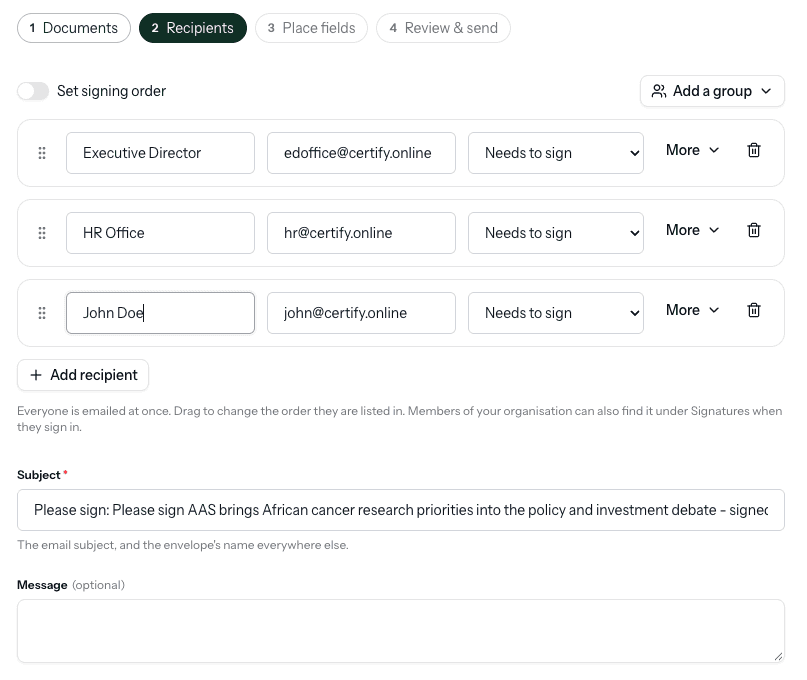
Add who needs to sign, approve, view or get a copy, and set the signing order if it matters. Drag signature, initials, date, name, company and title fields onto the pages.
02Step 03
Signers sign from their email
Each person gets a personal link when it's their turn. They draw, type or upload a signature on any device, with no account and no download. You can ask for an emailed code as well.
03Step 04
Track it and get the signed copy
Watch each person open and sign, send reminders, and correct a mistyped email. When everyone has finished, all of them receive the signed PDF with a certificate of completion.
04
What you get
Built for the details that make it trustworthy
Almost any document
PDF, Word, Excel, PowerPoint, OpenDocument, text and images, combined into one A4 document.
Signing order
People act in the order you set, or at the same time when they share a number.
Four roles and groups
Signers, approvers, viewers and copies. Save groups like "Finance team" to add several at once.
Identity checks
Every link is personal and secret. Ask for a 6-digit emailed code for extra assurance.
Sign any way
Draw, type in a handwriting font, or upload a signature. Members can reuse a saved one.
Reminders and corrections
Nudge whoever's turn it is, fix a wrong email, or void the envelope with a reason.
Send now or later
Schedule an envelope to go out later, and set how many days it stays open.
Certificate of completion
Appended to the signed PDF: each signer, how they were verified, their IP address and every event with times.
Check any copy
The finished PDF is fingerprinted, so anyone can confirm a copy is the original, unchanged.
Who it's for
Wherever proof of achievement matters
Admissions and registry
Offer letters, enrolment forms and agreements signed by students and guardians.
HR
Contracts, policies and onboarding forms signed before day one.
Finance and procurement
Approvals routed in order, from the requester to the approver to the signatory.
Legal and compliance
Agreements with a complete record of who signed, how they were verified and when.
Partnerships
MOUs and partner agreements signed across organisations without a printer.
Operations
Everyday sign-offs that used to wait on a desk for a wet signature.
Questions people ask
Send your first envelope today
Upload a document, add who signs, and it's on its way in minutes, with a full record at the end.